EN ------------------
Hello everyone,
To forgive me for taking so long to redesign the game, I have concocted a little AR application with Worgy !
It's done a bit "hard"!
Obviously, I couldn't spend too much time there :)
Only works with Android, version 8.0 and above.
Your smartphone must be compatible for AR (augmented reality).
If you have any doubts or to check compatibility, you can retrieve the ARLOOPA (or other) application from the google play store.
To install the game:
1- Unzip the file find here: https://anthrius.itch.io/the-streets-of-eternea (click on download, put 0 € in price and after validation download file AARGame Worgy 1.0 - gift only for patreon - android.zip)
Password: patreongift!
You will obtain the file "AARGame Worgy.apk"
2- Copy this file to your smartphone
3- Click directly on the .apk file to install.
It will probably be necessary to allow the installation of external API.
A new icon with the name "AARGame Worgy" will be added to your screen.
To play :
1- Double click on the "AARGame Worgy" icon
When using for the first time, the application must be authorized to access the camera in order to enable the picture in picture.
No other authorization will be requested.
2- After displaying the logo, the game will search for the playing area.
To help him in this operation, do not hesitate to go through the whole room where you are.
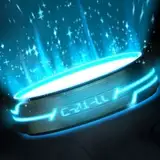
Wait for the blue circle to appear in the center of the screen, at ground level.
It takes around 10 seconds depending on the power of your smartphone.
5- To activate Worgy, all you have to do is click on an area of
the screen!
6- By clicking on another area of
the screen you will move Worgy to the new position.
To "lock" Worgy on a position, click on the lock at the bottom of the screen.
7- You can then, using the arrows <and>, change the animation.
Almost all the animations present in the TSOE game have been used here! 44 different animations! ;)
You can therefore make Worgy play sports, make him sleep, etc etc ...
You may have some texture artifacts.
Unfortunately, unless I spend a lot more time there, I can't do much about it ...
8- You can pinch the screen with two fingers to adjust the zoom and enlarge or reduce Worgy.
Have fun ;)
Regards,
Anthrius.
FR ------------------------
Bonjour à tous,
Pour me faire pardonner de mettre autant de temps à la refonte du jeu, je vous ai concocté une petite application AR avec Worgy !
C'est fait un peu "à l'arrache" !
Forcément, je ne pouvais y passer trop de temps :)
Fonctionne uniquement avec Android, en version 8.0 et plus.
Votre smartphone doit être obligatoirement compatible pour l'AR (la réalité augmentée).
Si vous avez un doute ou pour contrôler la compatibilité, vous pouvez récupérer l'application ARLOOPA (ou autre) présent sur le play store de google.
Pour installer le jeu :
1- Dézipez le fichier présent ici : https://anthrius.itch.io/the-streets-of-eternea (click on download, put 0 € in price and after validation download file AARGame Worgy 1.0 - gift only for patreon - android.zip)
Mot de passe : patreongift!
Vous obtiendrez le fichier "AARGame Worgy.apk"
2- Copiez ce fichier sur votre smartphone
3- Clickez directement sur le fichier .apk pour faire l'installation.
Il faudra probablement autorisé l'installation d'api externe.
Un nouvel icône portant le nom "AARGame Worgy" sera ajouté sur votre écran.
Pour jouer :
1- Double cliquez sur l'icône "AARGame Worgy"
A la première utilisation il faudra autorisé l'application à accéder à la caméra pour permettre l'incrustation d'image.
Aucune autre autorisation en sera demandée.
2- Après l'affichage du logo, le jeu va rechercher la zone de jeu.
Pour l'aider dans cette opération n'hésitez pas à parcourir toute la pièce ou vous êtes.
Attendez que le cercle bleu s'affiche au centre de l'écran, au niveau du sol.
Il faut compter environs une 10aines de secondes suivant la puissance de votre smartphone.
5- Pour activer Worgy, il suffit de cliquer sur une zone de l'écran !
6- En cliquant sur une autre zone de l'écran vous déplacerez Worgy sur la nouvelle position.
Pour "bloquer" Worgy sur une position, cliquez sur le verrou en bas de l'écran.
7- Vous pouvez ensuite, via les flèches < et > changer d'animation.
Quasiment toutes les animations présentes dans le jeu TSOE ont été reprise ici ! 44 animations différentes ! ;)
Vous pouvez donc faire faire du sport à Worgy, le faire dormir, etc etc.... faites vous plaisirs !!!
Il est possible que vous ayez quelques artefacts de texture.
Malheureusement, à moins d'y passer beaucoup plus de temps, je ne peux pas y faire grand chose...
8- Vous pouvez pincer l'écran avec deux doigts pour régler le zoom et aggrandir ou réduire Worgy.
Amusez vous bien ;)
Cordialement,
Anthrius.
HungryWulfy
2021-11-05 17:32:32 +0000 UTCHungryWulfy
2021-11-04 16:53:30 +0000 UTC