![[DOWNLOAD] Xmas Themed Mini Pack - SlaveTats + Overlays](https://img5.illustratorsleak.com/storage/3/nt/gw/dbda34-019e84bd-37e4-758f-b558-b92f04466cb7.png)
![[DOWNLOAD] Xmas Themed Mini Pack - SlaveTats + Overlays](https://img5.illustratorsleak.com/storage/11/vf/lz/dbda34-019e84bd-37ee-7089-93af-e6aab37dd56e.png)
![[DOWNLOAD] Xmas Themed Mini Pack - SlaveTats + Overlays](https://img5.illustratorsleak.com/storage/7/vu/wh/dbda34-019e84bd-37f9-7c7e-8fb2-69f1ff997280.png)
![[DOWNLOAD] Xmas Themed Mini Pack - SlaveTats + Overlays](https://img5.illustratorsleak.com/storage/10/mq/re/dbda34-019e84bd-3808-7ecc-8da0-698784eeb86b.png)
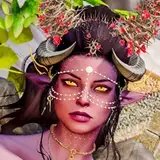
Hope you like this new tattoo mini pack. You can pick between SlaveTats version or RaceMenu Overlays version.
This mod works for both Legendary Edition (32 bit) and Special Edition (64 bit), but each one has sighly different requirements already mentioned above.
1. Make sure you have the requirements.
2. Download SlaveTats and extract it into the Skyrim Data folder.
3. Download this mod and extract it into the Skyrim Data folder.
3. Start Skyrim. You'll have a SlaveTats menu under the SkyUI's MCM.
4. On the Setup tab, select the character you want to apply a tattoo and then click Add/remove tattoos (so the mod will register my tattoo pack).
5. On the Body/Face tabs, select a Section and then a specific Pattern of your liking.
6. Pick color, glow and gloss if you like, or leave them with their defaults colors.
7. Exit the MCM and your tattoos will appear in a moment.